



Answer

no conference call set up capabilities

  • November 20, 2020
  • 6 replies
  • 401 views

Was this feature removed in the latest desktop version?!! Only video call is available that we have seen. Not every conference call needs or wants to be video, as a long-time customer we are disappointed that Ring Central removed this feature that we had relied on and will be a consideration on our next renewal.
Best answer by Anonymous

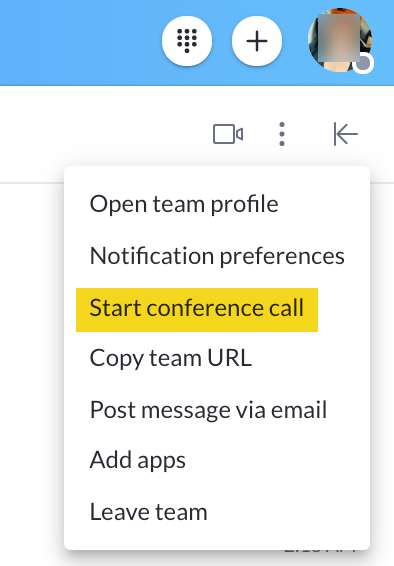
Hello @Karen Blanchard, our conference call is located in the Team Group chat. It is the 3 vertical dots on the right upper side below your avatar. Please see the image below.


2020-11-21-06-16-09.png


Thank you!

6 replies

  • Answer
  • November 20, 2020

Hello @Karen Blanchard, our conference call is located in the Team Group chat. It is the 3 vertical dots on the right upper side below your avatar. Please see the image below.


2020-11-21-06-16-09.png


Thank you!


  • Author
  • New Participant
  • November 23, 2020

Thank you but this starts a call with my team. I want to send a conference dial -in number to outside my team. Shouldn't this be under the phone call section?


  • Author
  • New Participant
  • November 24, 2020

This is a critical feature that we regularly use, that all of your competitors offer. Not every conference call needs to be a video call. Please consider putting this back in. Additionally the app is not very user friendly - the old app was straight forward and clear. At the very least allow customers to return to the old app. We will have to re-evaluate.


  • New Participant
  • January 6, 2021

I agree with Karen. Being able to schedule a conference call using Google Calendar is critical. I am extremely upset that this feature was removed without warning and would like it back.


I also agree- in fact, the primary reason I just got a Ring Central account was to do exactly this- schedule audio conference calls from within the calendar


  • New Participant
  • April 15, 2021

Apparently, the conferencing feature was also removed from the RingCentral Outlook add-in?? I just installed it for my Outlook and I don't see the conference icon to be able to setup and invite participants to a conference call. So, it appears the only way to create a conference call appointment is to sign into the admin portal and setup a conference call from there.