Question

Do we need to add anything in the manifest file to enable contact matching via findContact()?

  • July 11, 2025
  • 4 replies
  • 85 views

Hi team,

I'm implementing the findContact() interface in a custom RingCentral App Connect adapter. The function is being called correctly, and I’m returning a matching contact (with correct id, name, phoneNumbers, and type), but App Connect is not showing the contact.


4 replies

ByrneReese
Community Manager
Forum|alt.badge.img+3
  • Product Manager
  • July 11, 2025

@medharustagi Welcome to the App Connect developer community. I am excited to learn more about the adapter you are building - if you have a moment, please share the details if you feel comfortable doing so. 

As for your question, there is nothing that you need to do in the manifest file to make the contact appear. Would you mind sharing with us what you are returning? Show us your code and perhaps an HTTP trace? 

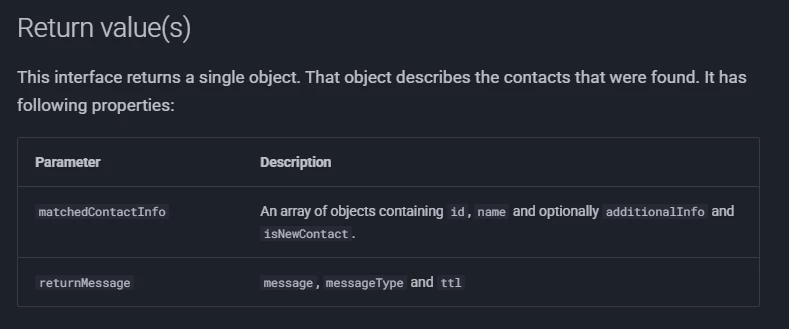
Confirm you are returning an array of contacts that looks like this:

{

   id: <string>,

   name: <string>,

   title: <string>,

   company: <string>,

   phone: <string>,

   additionalInfo: { }

}

And that your return statement looks like this:

return {

   successful: true,

   matchedContactInfo: ARRAY

};


  • Author
  • New Participant
  • July 14, 2025


Thanks for replying.Yes, we followed the developer documentation to integrate App Connect with our custom CRM:https://ringcentral.github.io/rc-unified-crm-extension/developers/getting-started/ , I've been going through the documentation for the findContact interface, and we followed the same approach. You can see the response data below:

{
  "successful": true,
  "returnMessage": {
    "message": "Found 1 contact",
    "messageType": "success",
    "ttl": 30000
  },
  "matchedContactInfo": [
    {
      "id": "contact id",
      "name": "John Doe"
    }
  ]
}


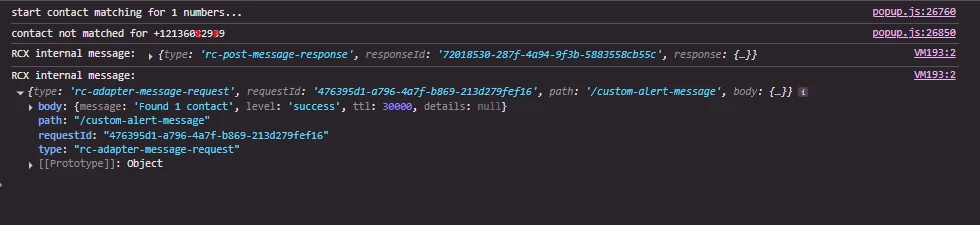
I can see the logs from the extension after clicking "Refresh Contact" that “contact not matched” and there's also a success toast message saying "Found contact." This is happening because the adapter responded with that success message

Is there anything else we should check or consider?


ByrneReese
Community Manager
Forum|alt.badge.img+3
  • Product Manager
  • July 17, 2025

Let me reach out to do a brief troubleshooting session with you. I will also alert ​@dakong to see if he has any insights. 


Embbnux
Employee
Forum|alt.badge.img+1
  • Employee
  • July 18, 2025

Hi ​@medharustagi I sent you a private message in the community chat with my email. Can you share your manifest and HAR file logs to me for checking more.
You can open chrome developer tool by right click at this app, and Inspect. Then go to network panel. And when you refresh contact, you should be able to ses what response from server side.