




Answer

Deskop App - Icon flashing or pop up on messages

  • May 31, 2022
  • 8 replies
  • 573 views

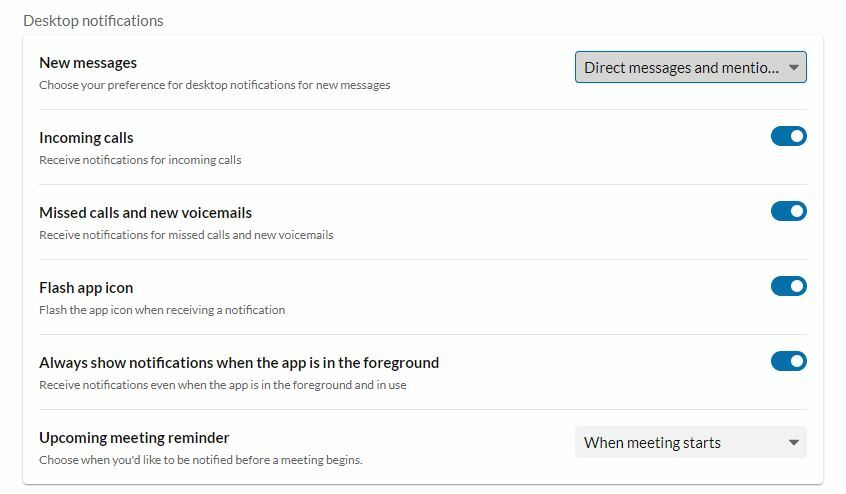
All i get is a red dot and no flashing or pop up messages or anything. curious why the flashing isn't happening on the app when i have it turned on within the notifications section. trying to make it easier to identify when there is an unread message.

Best answer by brian-4

see attached. capture.jpg

8 replies

Mary-Community_Moderator
Community Manager
Forum|alt.badge.img+1

Hi Brian, are you using PC or MAC?


  • Author
  • Inspiring
  • May 31, 2022

PC. i found the link from RingCentral on the solution and seemed it was already set to flash.


https://support.ringcentral.com/article/Configure-the-Behavior-of-the-RingCentral-App-Desktop-Icon-for-New-Messages.html


  • Author
  • Inspiring
  • May 31, 2022

thats the issue though, it isnt working. when i opened the settings, all was previously set properly. i see no flashing or anything.


  • Author
  • Inspiring
  • Answer
  • May 31, 2022

see attached. capture.jpg


Mary-Community_Moderator
Community Manager
Forum|alt.badge.img+1

Thank you! Can you please try to change New messages to All new messages?


  • Author
  • Inspiring
  • May 31, 2022

ok that worked! one more question, is there any way to delete a chat completely vs individual messages?


  • Author
  • Inspiring
  • May 31, 2022

and i mean if 2 people are messaging, you can remove individual lines of chat in that message but not the entire message with one button click.


Mary-Community_Moderator
Community Manager
Forum|alt.badge.img+1

There is no option as of now, but the Product Team is considering it. You may vote for this feature here.