Clicking Ignore Call or Declining the call does not stop the phone from continuing to ring

  • July 13, 2020
  • 59 replies
  • 10833 views

Show first post

59 replies

  • New Participant
  • September 15, 2025

Just chiming in to express how incredibly frustrated I have been with this nonstop ringing “feature” ever since signing up for RingCentral nearly a decade ago. I am the sole call queue member, and every time I decline a call, it just rings me again nonstop for the next few minutes.

I suppose the only reason I haven’t left RC yet is pretty much Stockholm Syndrome at this point. I have gotten so used to it that I may even miss the abuse when it stops happening.

PLEASE, for the love of all that is good, FIX THIS!


@apexballoons 
can you try the solution mentioned in the following post 

It doesn’t apply to simultaneous call queues, but it should work in your case since you have a 1 member call queue.


  • New Participant
  • September 16, 2025

@apexballoons 
can you try the solution mentioned in the following post

I have just updated my settings to this. Thanks for the suggestion - hopefully it works!


  • New Participant
  • September 17, 2025

@martintsankov it seems like it has solved my problem! Thanks so much for enlightening me!


  • New Participant
  • October 30, 2025

Can we please have an update on this?!?!!!!


  • New Participant
  • December 16, 2025

Hi All,
Just seeing if there is any kind of update on this?
We have noticed that even if a user is on a call via a call queue, they will still get the pop up if another call comes through to the same queue, which is obviously quite frustrating.

The only way to stop it is if the user has their DND on which seems like a cumbersome process every time you get on a call.

Many thanks,
Jacob


Mary-Community_Moderator
Community Manager
Forum|alt.badge.img+1

Hi All,
Just seeing if there is any kind of update on this?
We have noticed that even if a user is on a call via a call queue, they will still get the pop up if another call comes through to the same queue, which is obviously quite frustrating.

The only way to stop it is if the user has their DND on which seems like a cumbersome process every time you get on a call.

Many thanks,
Jacob

Hi ​@JacobF, You might want to try the solution shared in this topic. It could help with what you’re experiencing. Let us know how it goes! 


  • New Participant
  • December 16, 2025

Hi All,
Just seeing if there is any kind of update on this?
We have noticed that even if a user is on a call via a call queue, they will still get the pop up if another call comes through to the same queue, which is obviously quite frustrating.

The only way to stop it is if the user has their DND on which seems like a cumbersome process every time you get on a call.

Many thanks,
Jacob

Hi ​@JacobF, You might want to try the solution shared in this topic. It could help with what you’re experiencing. Let us know how it goes! 

Hi Mary,
Thank you for reaching out to me.
Unfortunately, that isn’t quite the issue I am facing.

The issue is about the pop up from the call continuing to pop up even if a user selects “Ignore” on the call, as it continues to pop up regardless of how many times you select the “Ignore” option.

Is there a way to set it up so that if a user selects “Ignore” the call will no longer pop up at all but only for that user in particular? So that other users in the same call queue have the ability to still pick up the call.

Many thanks,
Jacob


@JacobF 

We have noticed that even if a user is on a call via a call queue, they will still get the pop up if another call comes through to the same queue, which is obviously quite frustrating.

This shouldn’t happen with default settings because queues check the status of the members. If a member is Busy on a call they wouldn’t get a pop up. 
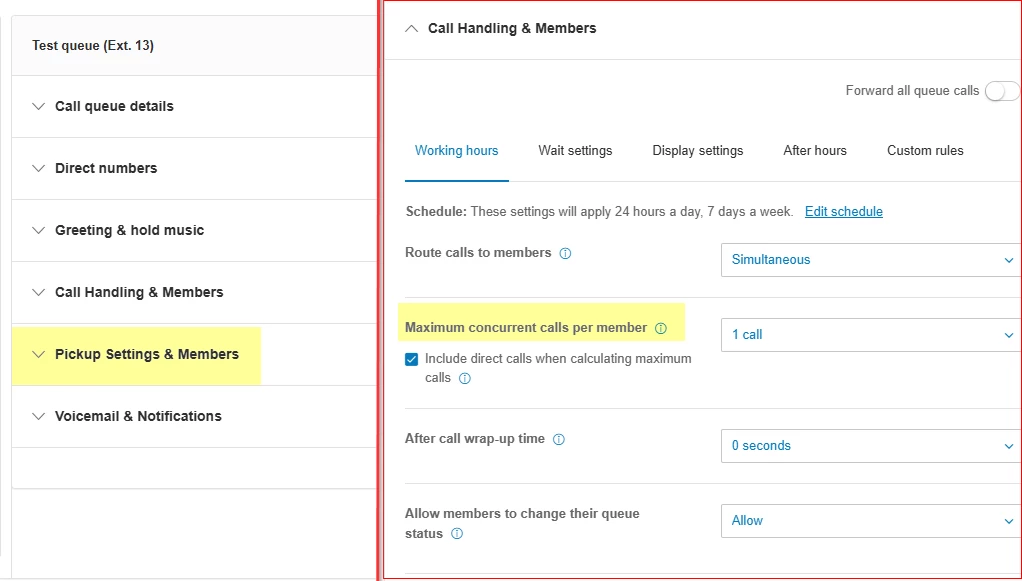
I am guessing you either have call queue pickup or have increased the Max concurrent calls as shown in pic below

Is there a way to set it up so that if a user selects “Ignore” the call will no longer pop up at all but only for that user in particular? So that other users in the same call queue have the ability to still pick up the call.

What Mary linked should work for a Fixed Order or Longest Idle call queue. If your queues are set to Simultaneous, then we need to check if there is a feature enhancement planned to support this. In the meantime the user should put themselves on DND or should toggle off Accept queue calls in the app.