Answer

Calls are not logged with the contact names from Bullhorn

  • November 22, 2024
  • 8 replies
  • 173 views

Forum|alt.badge.img

 Calls are not logged with the contact names from Bullhorn in the RingCentral CRM Extension. Only after manually refreshing a call entry the name from the respective Bullhorn contact is displayed (see screenshot below, for instance “Niels Körner” was manually refreshed to get the name in the display). How can I get a call list, that always displays names and not phone numbers? 

 

Best answer by dakong

@ryantrainorr 

  1. The sync up question. The extension doesn’t actually sync contacts from Bullhorn. It gets contact information on-the-fly and keep that for a while. The actual contact syncing which keeps contact information all correct all the time isn’t implemented in our service. There are many reasons, but the main one is, it’s complicated and it takes a lot of efforts.
  2. Refresh contact. This is to verify that your Bullhorn session is working inside your Chrome extension. From your screenshot, it looks like it’s working fine. I may need more information. Could you send me a screen recording of the issue? To da.kong@ringcentral.com. Thanks!

8 replies

ByrneReese
Community Manager
Forum|alt.badge.img+3
  • Product Manager
  • November 22, 2024

@Thomas Biber I will reach out to privately to schedule time to troubleshoot. Also - can you attach your screenshot?


Forum|alt.badge.img
  • Author
  • New Participant
  • November 25, 2024

@ByrneReese  Hi, thanks for your reply . Here is a screenshot: see attachement. If I manually refresh the display (via the three dot menu → Refresh), I get the names. But I would have to do this for all calls in the list manually. 


  • New Participant
  • August 21, 2025

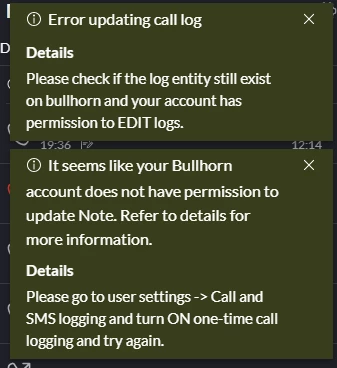
For some reason I’m dealing with a flickering offline/online connecting issues when I log calls. I still get these errors when one time call logging has been toggled on.

any idea’s to try for a fix? I have about 65 calls that have not logged because of it.


dakong
Community Manager
  • Community Manager
  • August 25, 2025

@ryantrainorr 

Quick confirm: were those calls not logged as Bullhorn Notes under Candidates/Contacts?

If they were not logged, then it might be some other issue than the one in screenshot. Could you follow these steps to check:

  1. In the extension call history page, find a known contact that’s in Bullhorn
  2. Hover on the call record and click “...” button then “Refresh contact”

Please let me know what do you see. Thanks! 


  • New Participant
  • August 25, 2025

[IMAGE REMOVED]

Do you know how to get the application (left) and the chrome extension (right) to be sync’d up? some of the contacts update but also some i have to manually enter their names on both.

Moderator comment - my apologies, but I decided to remove this image as it contained a lot of personal information. If we need to exchange personal identifiable information like this in the future, share is via direct message. 


  • New Participant
  • August 25, 2025

@ryantrainorr 

Quick confirm: were those calls not logged as Bullhorn Notes under Candidates/Contacts?

If they were not logged, then it might be some other issue than the one in screenshot. Could you follow these steps to check:

  1. In the extension call history page, find a known contact that’s in Bullhorn
  2. Hover on the call record and click “...” button then “Refresh contact”

Please let me know what do you see. Thanks! 

I tried doing this but didn’t see much happen when I “refresh contact”.


dakong
Community Manager
  • Community Manager
  • Answer
  • August 26, 2025

@ryantrainorr 

  1. The sync up question. The extension doesn’t actually sync contacts from Bullhorn. It gets contact information on-the-fly and keep that for a while. The actual contact syncing which keeps contact information all correct all the time isn’t implemented in our service. There are many reasons, but the main one is, it’s complicated and it takes a lot of efforts.
  2. Refresh contact. This is to verify that your Bullhorn session is working inside your Chrome extension. From your screenshot, it looks like it’s working fine. I may need more information. Could you send me a screen recording of the issue? To da.kong@ringcentral.com. Thanks!

  • New Participant
  • August 26, 2025

I think your first answered my question. I’ll just keep manually adding. Thanks so much.