


The First Step
September 8, 2020
Question

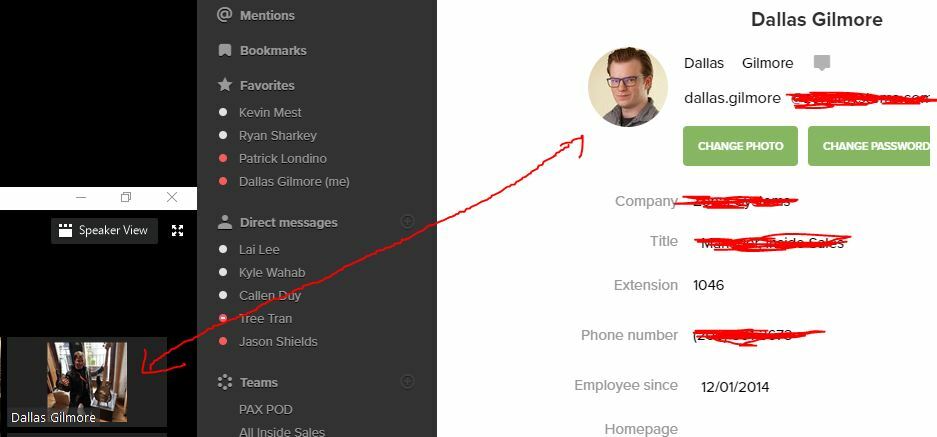
My Ring Central Profile Picture Does not mach my meeting picture.
  • September 8, 2020
  • 7 replies
  • 1134 views

So I updated my profile picture on the Ring Central Desk Top app but it's not updating inside of a meeting. Is there a way to update the picture that shows in a meeting when hiding video? I either need our official company picture or non at all. This is very important for my new job.

    7 replies

    September 9, 2020

    Hello Dallas, apologies! Can you try to uninstall the app and reinstall it? Thanks!

    New Participant
    September 17, 2020

    I have this same issue. I have tried all of the fixes and workarounds noted above with no luck. Please help RingCentral!

    New Participant
    September 17, 2020

    Hello, multiple people in my organization are experiencing this exact same issue. Profile Picture is updated within seconds for RingCentral App. However, it was not updated in the RingCentral Meeting App. I've tried multiple times and on different devices without any success. Please correct ASAP.


    Thank you,

    Juan

    New Participant
    September 17, 2020

    Hi @Juan Alfaro, @Adam Wells, @dallas-gilmore,

    I have been wrestling with this issue too. I have found a workaround for this problem.

    a) Download and install "Zoom" on your mobile or PC.
    b) Setup your Zoom profile.
    c) Once you are logged into the app, go to "settings", edit your profile, and add your profile picture.
    d) Zoom and Ring Central Meetings are compatible. Meaning you can start a zoom meeting and people using ring central meetings can join it. Or vice versa you can use Zoom to Join a Ring Central Meeting.

    You'll see that when you are in a meeting with your "Zoom" Profile it will show the zoom profile picture.

    Anyway hopefully you guys find this helpful in the meantime.

    The First Step
    October 16, 2020

    Has this issue been corrected yet? I need to change my picture!!! Why is this so difficult?!

    New Participant
    December 17, 2020

    Thank you, but this is not appropriate for all workplaces (bummer!) My work place exclusively uses Ring Central - I need the picture updated in the Ring Central ... I thought they fixed this in November, but i tried their Nov 2020 solution and it didn't work :(

    BeckyH
    Community Manager
    Community Manager
    December 17, 2020

    Hey, Team!
    Please refer to this Knowledge Base article:
    https://support.ringcentral.com/article/Profile-Picture-Does-Not-Update-RingCentral-Meetings.html
    If this does not resolve the issue, I would recommend connecting with Support so they can troubleshoot and escalate to the product team.

    Thanks!