Question

Issues with RingCentral App Connect (for Google Sheet & CRM integration)

  • April 15, 2026
  • 3 replies
  • 80 views

  • New Participant

Hi 


I’m trying to connect my CRM (ActiveCampaign) to RingCentral.


This is what I’ve done so far:

  • I’ve activated the “RingCentral App Connect” Chrome extension
  • I now see the icon next to the phone number of my contacts in ActiveCampaign
 

  • However, when I click that button, this is what I see:
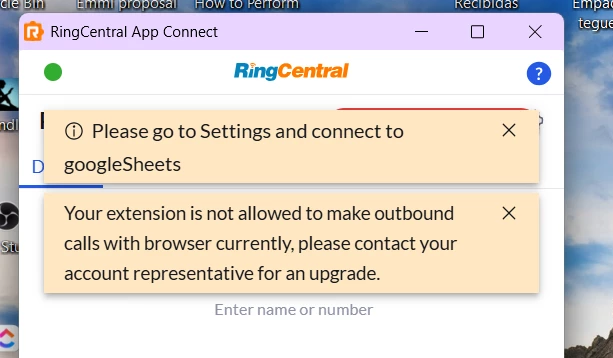


Can you please help me understand how to fix this?


Thank you very much for your help!

PCS

 

3 replies

ByrneReese
Community Manager
Forum|alt.badge.img+3
  • Product Manager
  • April 18, 2026

We do not yet have a specific integration for ActiveCampaign, which is why it is not working. App Connect can work to some limited extent, but the bulk of features require what we call a “connector”. - a service that translates App Connect events into API calls to the target CRM. I suggest visiting ideas.ringcentral.com to see if anyone else has requested this integration, and if so vote for it, otherwise submit the idea.


  • New Participant
  • July 14, 2026

I am trying to do this with Google Sheets, but when I try to go the the Google Sheets config in the settings, I try to create a new sheet or access an existing sheet, and it doesn’t work. When I try to create a new sheet and press “Create new sheet”, nothing happens. When I try to add an existing sheet, it opens up another browser window an a message from google comes up that I don’t have access.


dakong
Community Manager
  • Community Manager
  • July 15, 2026

@avanahealth22 There might be some problem with your existing Google connection. In App Connect extension, could you disconnect from Google Sheets and then connect back in and re-try the sheet config?