Question

Promoted to production .. but getting authorization error

  • April 28, 2021
  • 4 replies
  • 267 views

I see we are promoted to production. Do i need to set up credentials using Setup Wizard for our main account the same way i did for sandbox account?


4 replies

PhongVu
Community Manager
Forum|alt.badge.img
  • Community Manager
  • April 28, 2021

I don't know what is the "Setup Wizard" you mentioned above. But here is the fundamental requirement.

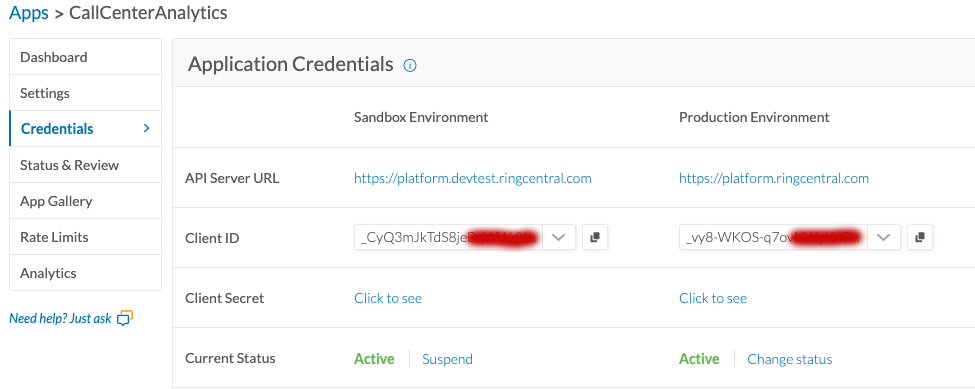
Use your app credentials (app client id and client secret) for you sandbox when you test it in sandbox environment.

Use your app credentials (app client id and client secret) for you production when you run your app in production environment.

screen-shot-2021-04-28-at-83427-am.png


If you use a RingCentral SDK, e.g. the RingCentral JS SDK, here is the example how to specify the app client id and secret

// sandbox server: "https://platform.devtest.ringcentrsl.com"
// production server: "https://platform.ringcentrsl.com"

var rcsdk = new RingCentral({ server: RINGCENTRAL_SERVER, clientId: RINGCENTRAL_CLIENTID, clientSecret: RINGCENTRAL_CLIENTSECRET });

  • Author
  • Participating Frequently
  • April 28, 2021

I am now using the Production Credentials . The password is same as the one is used for Sandbox

I still get following error

error" : "invalid_grant",

"errors" : [ {

"errorCode" : "OAU-140",

"message" : "Invalid resource owner credentials"

} ],

"error_description" : "Invalid resource owner credentials"


  • Author
  • Participating Frequently
  • April 29, 2021

I am still waiting for reply. I am unable to use Production Credentials for "GSMLSTEXT' app


  • Author
  • Participating Frequently
  • April 29, 2021

I am using the Production Credentials for "GSMLSTEXT" app. I am not sure about the password. I tried using my account password as well as Sandbox password. I get same error

I still get following error

error" : "invalid_grant",

"errors" : [ {

"errorCode" : "OAU-140",

"message" : "Invalid resource owner credentials"

} ],

"error_description" : "Invalid resource owner credentials"