



The First Step
August 17, 2026
Question

Is p-rc-session-id received from ringcentral-softphone-ts package invite headers unique everytime?

I have configured multiple softphones using https://github.com/ringcentral/ringcentral-softphone-ts package. On invite event of the call, I get the following information in header:
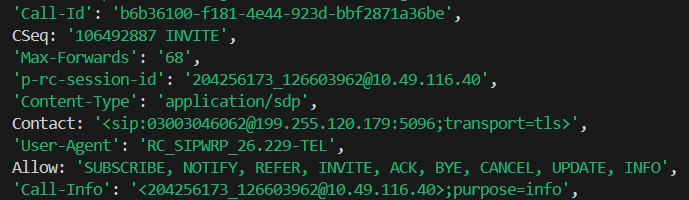
 

Since we can not receive telephony id until the call is answered, we would like to use a unique identifier as p-rc-session-id. Can we confirm if the p-rc-session-id repeats or not? Or we can save it as unique in the database?

5 replies

PhongVu
Community Manager
Community Manager
August 17, 2026

I believe that the p-rc-session-id is unique and won’t be repeated. However, the format are different for different type of calls.

E.g.

PSTN to : '275520245_49745652@10.115.152.11'

VoIP to VoIP: '0050425d-124d-4143-b342-c2958da1c194'

The First Step
August 17, 2026

​@PhongVu Thank you for answering.

Another things I wanted to confirm.

Our softphone implementation performs a blind transfer, where the call returns to the same softphone if the transferred agent does not answer or rejects the call. This behavior is configured through the transferred agent’s Incoming Call Handling settings.

However, when a human user transfers a call to the same agent, they perform a warm transfer. In this scenario, because the agent’s Incoming Call Handling is configured to return unanswered/rejected calls to the softphone, the human user expects to hear the “User not available” audio instead of having the call routed back to the softphone.

How can we configure RingCentral to achieve both behaviors?

  • Blind transfer: If the transferred agent does not answer or rejects the call, return the call to the originating softphone.

  • Warm transfer: If the transferred agent does not answer or rejects the call, play the agent’s “User not available” message rather than routing the call back to the originating softphone.

Is there a way to differentiate the call handling behavior based on whether the transfer was initiated as a blind transfer or a warm transfer through RingCentral’s setting or programatically?

PhongVu
Community Manager
Community Manager
August 17, 2026

​@PhongVu Thank you for answering.

Another things I wanted to confirm.

Our softphone implementation performs a blind transfer, where the call returns to the same softphone if the transferred agent does not answer or rejects the call. This behavior is configured through the transferred agent’s Incoming Call Handling settings.

However, when a human user transfers a call to the same agent, they perform a warm transfer. In this scenario, because the agent’s Incoming Call Handling is configured to return unanswered/rejected calls to the softphone, the human user expects to hear the “User not available” audio instead of having the call routed back to the softphone.

How can we configure RingCentral to achieve both behaviors?

  • Blind transfer: If the transferred agent does not answer or rejects the call, return the call to the originating softphone.

  • Warm transfer: If the transferred agent does not answer or rejects the call, play the agent’s “User not available” message rather than routing the call back to the originating softphone.

Is there a way to differentiate the call handling behavior based on whether the transfer was initiated as a blind transfer or a warm transfer through RingCentral’s setting or programatically?

A blind transfer is completely different from a warm transfer.

For a blind transfer, the system “forwards” a call to the transferred destination and terminate the call immediately regardless of the destination answers or rejects or not available. Thus, there is no way to return the call to the transferrer.

For a warm transfer, the transferrer puts the active call on-hold, makes a new call to the transferred destination, then “bridge” the calls. If the transferred destination does not answer, the active call is still in on-hold and can be resumed by the transferrer.

The First Step
August 20, 2026

​@PhongVu 
Thank you for the reply.

We want to experiment with an approach where we register an additional softphone and configure RingCentral to redirect the call to this softphone when a transferred user does not answer.

The additional softphone would determine whether the most recent transfer was a blind transfer or a warm/attended transfer and handle the call accordingly:

  • Blind transfer: If the transferred user does not answer, the call should be bounced back to the previous transferring agent.
  • Warm/attended transfer: If the transferred user does not answer, we should play the “User not available” audio to the transferring agent and then terminate the current warm-transfer session.

Could you please look into this approach and advise on the best way to implement it, including the required RingCentral APIs, events, and overall call flow?


PhongVu
Community Manager
Community Manager
August 21, 2026

I don’t know what problem you want to solve or service you want to provide. But here are the things:

Again, for a blind transfer, the transferee call is terminated as soon as the call is transferred, so there is no such a “bouncing back”. However, the targeted user can set their call handling to route any incoming calls (both transfer and direct call types) to a destination (if does not want to route to a voicemail or play an announcement then terminate the call), that destination can be the “transferee” who just transferred the call to the user. The original transferee’s softphone will receive a ringing (invite) and have to accept that call as a new call. You can identify that new call as a “bouncing back” if you compare the telephony session Ids of the original call and the new call. They should be the same. You have to test to verify this though.

For a warm transfer, the softphone just put the original call on-hold and make a new call to a transferred user. If the user is not available and the user call handling settings is set to “play announcement”, then the original sofphone can hear what ever message the user set and that new call will be terminated. Then it can un-hold the original call and decide whatever it wants to do with that call.