The First Step
Feb 9, 2021 7:01 PM UTC
Solved

How can admin find and listen to another ext manually recorded phone call?

I am an admin and cannot find the other users to listen to the calls that they manually recorded. We do not have the automatic recording option with our plan.

    sarah-6Answer
    New Participant
    Feb 1, 2022 7:49 PM UTC

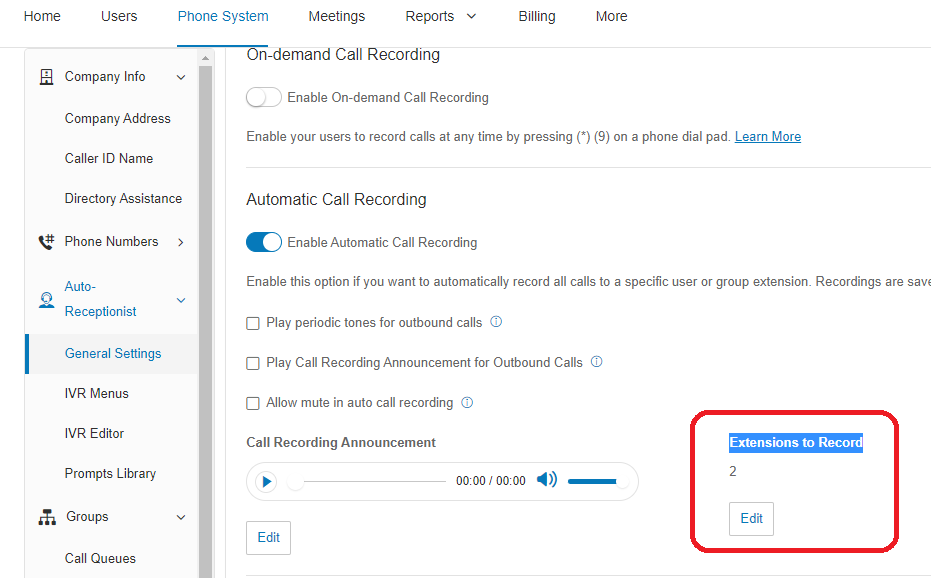
    @Nate Goff Hello! I recently had this question too to view my users not just my own extension. So I found that on the Online Admin Portal. The automatic call recordings are set to auto-record just 1 extension (mine) so once I updated that to record my other user (see the image). Then from there, I was able to view all call recordings in the admin account under "Reports" > "Call Log" and then the little play button was then available for the calls thereon.
    ring-central-auto-record.png

    5 replies

    Mary-Community_Moderator
    Community Manager
    Community Manager
    Feb 9, 2021 10:42 PM UTC

    Hi @Nate Goff, if you are referring to On-Demand Call Recordings, check this KB Article.

    The First Step
    Feb 9, 2021 10:53 PM UTC

    @Mary-Community_Moderator that works to listen to my own extensions calls. But how do I listen to other extensions calls?

    Mary-Community_Moderator
    Community Manager
    Community Manager
    Feb 10, 2021 3:16 PM UTC

    @Nate Goff, you must go to your Admin Portal.

    sarah-6Answer
    New Participant
    Feb 1, 2022 7:49 PM UTC

    @Nate Goff Hello! I recently had this question too to view my users not just my own extension. So I found that on the Online Admin Portal. The automatic call recordings are set to auto-record just 1 extension (mine) so once I updated that to record my other user (see the image). Then from there, I was able to view all call recordings in the admin account under "Reports" > "Call Log" and then the little play button was then available for the calls thereon.
    ring-central-auto-record.png

    Mary-Community_Moderator
    Community Manager
    Community Manager
    Feb 1, 2022 8:37 PM UTC

    Great idea, @Sarah Sinanan!