


The First Step
July 28, 2022
Solved

In the Ring Central App in the actions drop down and in HUD, conference is not showing on anyone's app who is not a system admin. How do we get that to show so users can schedule a conference call?

  • July 28, 2022
  • 2 replies
  • 448 views

Under HUD you should see conference. It is not listed. Under actions at the top of the app start a conference call is not an option.

Best answer by Mary-Community_Moderator

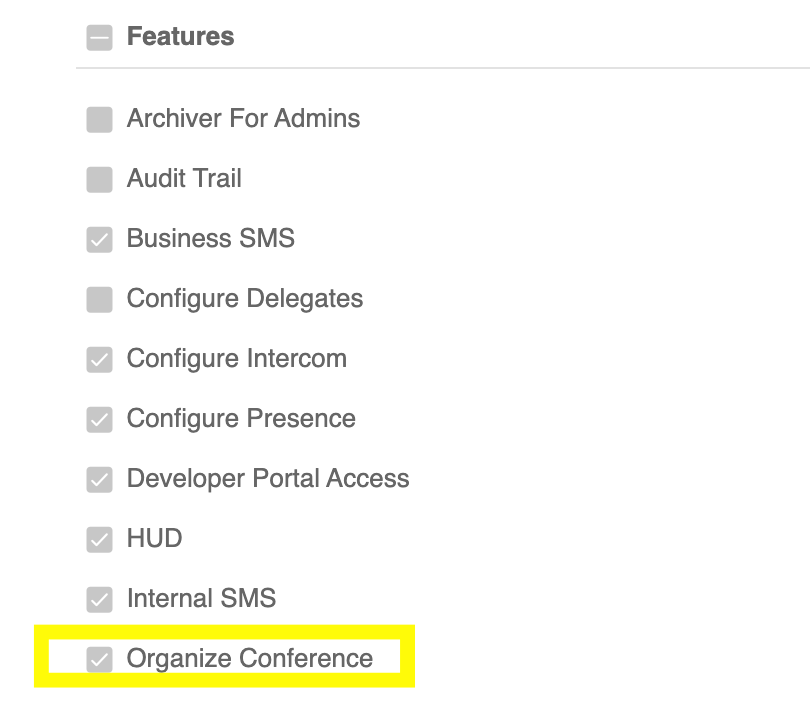
Please check if the extension's permission "Organize conference" is enabled or checked.


screen-shot-2022-07-29-at-43605-am.png

First, you need to know what is the user's current role. For example, the user's role is Standard (International). Go to Admin Portal > Users > Roles. Select Standard ( International), then check the current permissions enabled. Under Features, "Organize Conference" should be enabled.


2 replies

Mary-Community_Moderator
Community Manager
Community Manager
July 28, 2022

Please check if the extension's permission "Organize conference" is enabled or checked.


screen-shot-2022-07-29-at-43605-am.png

First, you need to know what is the user's current role. For example, the user's role is Standard (International). Go to Admin Portal > Users > Roles. Select Standard ( International), then check the current permissions enabled. Under Features, "Organize Conference" should be enabled.


tganttThe First StepAuthor
The First Step
August 2, 2022

Yes that is what we did to fix it once we figured out it was in roles.