Hi @john-oliphant, apologies for the late response to this.
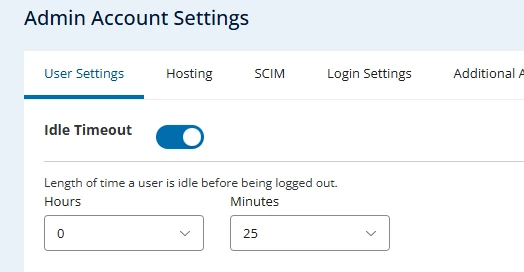
The Idle Timeout setting under Admin Account Settings in your screenshot applies to session inactivity on the UserHub web portal, rather than agent logouts in MAX Agent.
In NICE CXone / MAX Agent, agents are never automatically logged out while in an Available state. Automatic logouts occur only when an agent is placed in an Unavailable status (such as Lunch or Break), which follows the specific timeout duration assigned to that unavailable code.
If agents are getting abruptly disconnected or logged out while set to Available, the cause is usually related to local workstation or network behavior rather than an admin setting change. For example, if an agent steps away and their computer goes into a deep sleep mode after 15 minutes, background browser processes pause, which immediately drops the live agent connection.
Here’s what you can do next,
-
Verify Agent Status: Confirm whether the agent was in an Available state or an Unavailable code when the logout occurred.
-
Check Workstation Power Settings: Ensure OS sleep/hibernate settings are not turning off network interfaces or suspending idle browser tabs.
-
Open a Support Ticket: Since diagnosing premature disconnects requires inspecting detailed agent session logs, please submit a case via the RingCentral New Case Portal. Include the affected agent's extension, exact timestamps, and browser details so our technical team can review the backend disconnect reasons.