Lariane
The First Step
The First Step
February 27, 2026
Solved

Realtime Dashboard Widget Colours Not Saving

  • February 27, 2026
  • 5 replies
  • 37 views

Hi, happy Friday!


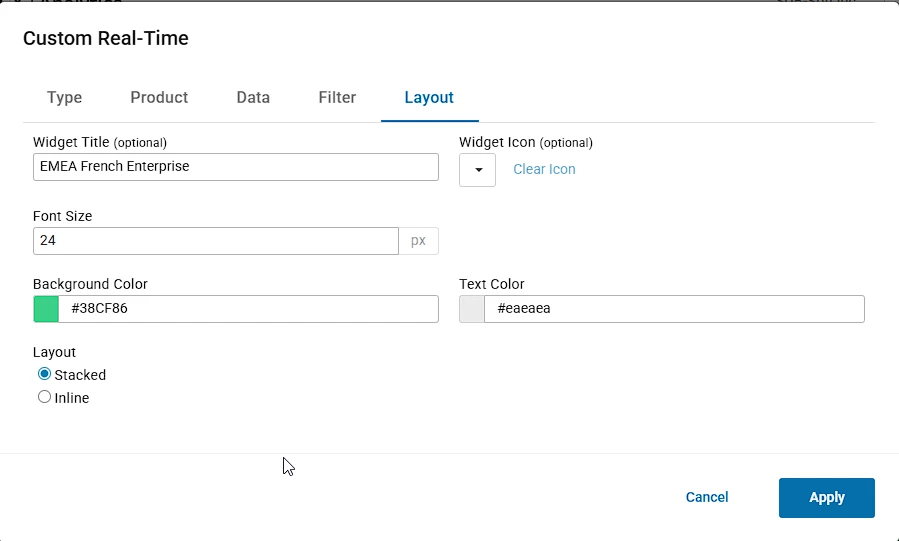
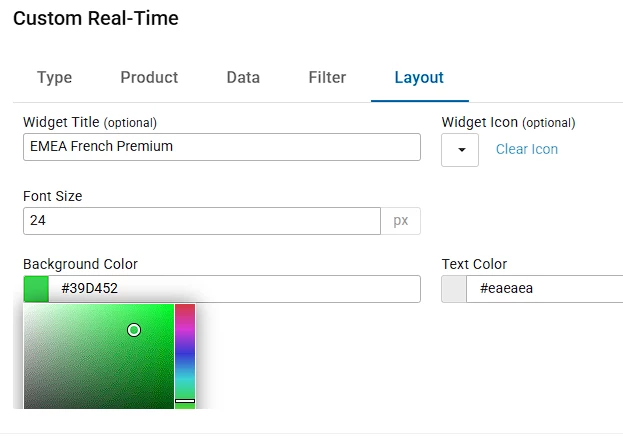
Just wondering if anyone else is having any issues with the Realtime Dashboard Widgets not saving HEX colours?


 I am trying to standardize the colours used and when inputting HEX colour codes, it saves but does not apply. 


The only way to apply it by selecting it from the colour picker which isn’t as accurate; 


Thank you. 

Best answer by Lariane

Hi everyone,

Just sharing a quick update in case anyone else runs into the same issue.

After some additional troubleshooting with @Austin Miranda, the behaviour was successfully replicated on my account. The issue where HEX colour codes save but do not apply correctly to Realtime Dashboard widgets appears to be a platform bug rather than a formatting or input issue.

Austin collected console and HAR logs along with a replication recording and has escalated the issue to the Service Engineering / Development team for further investigation.

At the moment, the workaround is still to use the colour picker, as manual HEX input may not consistently apply.

The case has now been escalated internally and is awaiting review and resolution by the development team. I’ll update this thread if there are any further updates or once a fix is released.

Thanks again to Austin for helping investigate this.

Lariane

5 replies

Employee
February 27, 2026

Hello ​@Lariane


I logged into my test account and tried to replicate the issue, however, I was unable to do so. I manually typed and copy/pasted multiple different color codes into the background color setting and all of them applied successfully. 

I did however find a way that this could fail. If you type or paste a color code into the background color setting and there is an extra space at the end of the color code entered, it does not apply successfully. 

I would retest ensuring there are no extra spaces at the end of the color code entered and see if it is applying, if not, I would recommend opening a support ticket so our team can dive in and troubleshoot! 

Lariane
The First Step
LarianeThe First StepAuthor
The First Step
March 2, 2026

Hi ​@Austin Miranda

Yeah, I’d presumed so but even when I write it out manually, it still doesn’t save (it took over 10 attempts to get the colour to save for one widget). 

Recording 1 was from Friday, Recording 2 is from today. 

Let me know if there is anything else you’d recommend, before I need to open a ticket as I’ve not had much success scheduling meetings in my time zone with the team in the past sadly. 

Thanks!

Lariane
Employee
March 2, 2026

Good morning ​@Lariane, I am sorry to hear that you have difficulty scheduling meetings with our team in your time zone. 

I logged into your account this morning and I was able to replicate the issue you are having there. I have collected Console & HAR logs, along with a recording of my replication. Please open a support ticket for this issue. Once you have done so, please provide me the ticket number here. Once I have the case number, I will take ownership of this ticket and escalate this issue on up to our Service Engineering team. 

Lariane
The First Step
LarianeThe First StepAuthor
The First Step
March 2, 2026

Hi ​@Austin Miranda, I’ve DM’ed you the case number. 

FYI I tried to attach the HAR logs and recording (As shared above) and it was too big for the case portal and email bounced back as Spam 🤣

Lariane
Lariane
The First Step
LarianeThe First StepAuthorAnswer
The First Step
March 16, 2026

Hi everyone,

Just sharing a quick update in case anyone else runs into the same issue.

After some additional troubleshooting with @Austin Miranda, the behaviour was successfully replicated on my account. The issue where HEX colour codes save but do not apply correctly to Realtime Dashboard widgets appears to be a platform bug rather than a formatting or input issue.

Austin collected console and HAR logs along with a replication recording and has escalated the issue to the Service Engineering / Development team for further investigation.

At the moment, the workaround is still to use the colour picker, as manual HEX input may not consistently apply.

The case has now been escalated internally and is awaiting review and resolution by the development team. I’ll update this thread if there are any further updates or once a fix is released.

Thanks again to Austin for helping investigate this.

Lariane

Lariane