



The First Step
March 19, 2021
Question

MMS Not Working

Hello, I have a custom app that is using cURL. I have worked on a couple of end points and all seem to be working perfectly. However when I test this endpoint:

https://platform.ringcentral.com/restapi/v1.0/account/accountId/extension/extensionId/mms


It does not want to work. When I go to the RingCentral API website and try the end point there via the interface it complains about a wrong phone number, even though it is correct. It is the same phone number i use on the SMS end point and works perfectly.
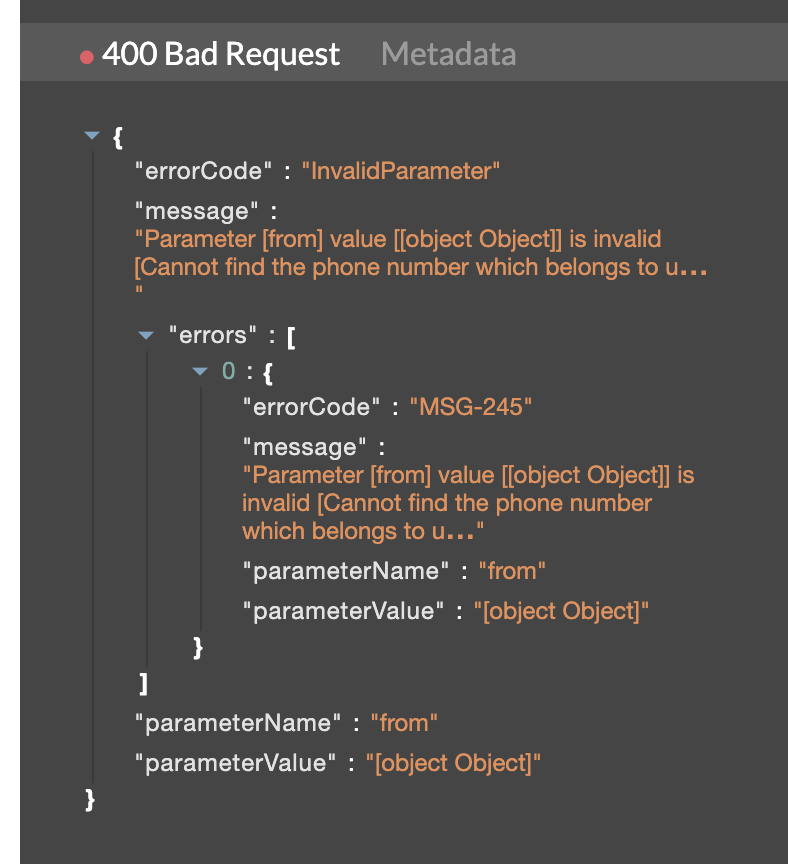
screen-shot-2021-03-19-at-25758-pm.png

    8 replies

    PhongVu
    Community Manager
    Community Manager
    March 22, 2021

    Can you try one of the programming language codes from the link below?

    https://developers.ringcentral.com/guide/messaging/sms/sending-images

    ismaelThe First StepAuthor
    The First Step
    March 24, 2021

    Sorry but for my app it has to be done with cURL

    PhongVu
    Community Manager
    Community Manager
    March 24, 2021

    What I was asking you to do was for double checking to see if your account, number and content are correct and works well. If it works with the code then we know the way you call cCurl is the problem.

    The First Step
    March 24, 2021

    I have the same problem, but i use python.

    My SMS app works perfectly, but when i try to send a MMS i get the phone number error

    ismaelThe First StepAuthor
    The First Step
    March 24, 2021

    Just to clarify a bit more, I have been using the SMS end point with cURL and it works perfectly but the MMS is giving wrong Phone Number error. When I go to the RingCentral API website and test out the MMS end point, I also get the same error, in other words it looks like it is also broken on their site.

    PhongVu
    Community Manager
    Community Manager
    March 24, 2021

    Can you both call thing this API and detect if your number support "MmsSender" feature?

    Using the RingCentral Python SDK, the code is something like this:

    from ringcentral import SDK
    
    RECIPIENT = '<ENTER PHONE NUMBER>'
    
    RINGCENTRAL_CLIENTID = '<ENTER CLIENT ID>'
    RINGCENTRAL_CLIENTSECRET = '<ENTER CLIENT SECRET>'
    RINGCENTRAL_SERVER = 'https://platform.devtest.ringcentral.com'
    
    RINGCENTRAL_USERNAME = '<YOUR ACCOUNT PHONE NUMBER>'
    RINGCENTRAL_PASSWORD = '<YOUR ACCOUNT PASSWORD>'
    RINGCENTRAL_EXTENSION = '<YOUR EXTENSION, PROBABLY "101">'
    
    rcsdk = SDK( RINGCENTRAL_CLIENTID, RINGCENTRAL_CLIENTSECRET, RINGCENTRAL_SERVER)
    platform = rcsdk.platform()
    platform.login(RINGCENTRAL_USERNAME, RINGCENTRAL_EXTENSION, RINGCENTRAL_PASSWORD)
    
    def read_extension_phone_number():
      resp = platform.get("/restapi/v1.0/account/~/extension/~/phone-number")
      jsonObj = resp.json()
      for record in jsonObj.records:
        for feature in record.features:
          print (feature)
    
    read_extension_phone_number()


    ismaelThe First StepAuthor
    The First Step
    March 24, 2021

    Unfortunately I cannot test it with Python, however if you go to the RingCentral API website:

    https://developers.ringcentral.com/api-reference/SMS/createMMS
    If you test that end point out, it will work without an attachment, it will run perfectly. However if you add an attachment to the MMS it gives you a phone number error.

    PhongVu
    Community Manager
    Community Manager
    March 24, 2021

    That is why I asked you to check if your number support MMS.

    You can cCURL to send a message. You CANNOT cCURL to get your number info?