

New Participant
January 24, 2020
Question

Password Authentication error OAU - 149

I am using Java and trying to retrieve Call Log Records. trying to get a token for the call

https://platform.devtest.ringcentral.com/restapi/v1.0/account/@account/extension/@extension/message-store

Unirest.post(AuthURL);

rs.header("accept", "application/json");

rs.header("Content-Type", "application/x-www-form-urlencoded");

rs.header("Authorization", "Basic "+ClientId+ClientSecret );

parameters :

Map<String,Object> m = new HashMap<String,Object>();

m.put("grant_type", "password");

m.put("username", xxxxxx);

m.put("extension", "xxx");

m.put("password", xxxxxx);


when executed get { "errorCode" : "TokenInvalid", "message" : "Invalid token", "errors" : [ { "errorCode" : "OAU-149", "message" : "Invalid token" } ] }


Can anyone tell me the correct syntext to use for the authorization?

application https://platform.devtest.ringcentral.com/
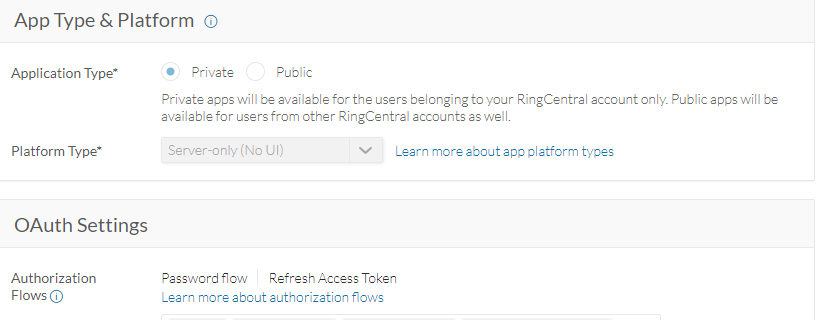
settings as above. using the "try it" apps all works .

4 replies

The First Step
January 24, 2020

Since you are using password flow. the API to get the token is as follows:

url: https://platform.devtest.ringcentral.com/restapi/oauth/token

Header:

Content-Type: application/x-www-form-urlencoded

Authorization: Basic <Base64 of clientid:client secret>

Body parameter :

username=<user name>&password=<password>&extension=<extension>&grant_type=password

Please note: Here in the header Authorization will be Base64 encoding of clientid:client secret

rs.header("Authorization", "Basic "+Base64 of ClientId+":"+ ClientSecret ); 


The First Step
January 26, 2020

Please refer the below screen shot.

The First Step
January 26, 2020
PhongVu
Community Manager
Community Manager
January 27, 2020

Is there any reason why you cannot use the official RingCentral Java SDK. It would save you lots of time.

See this dev guide on how to work with the message store.