



The First Step
December 16, 2021
Question

Using API to Create Message Store Report

Hello,

I am trying to write a python script to download a voicemail from the developer account I created. Id gone through the API Reference and I found a page on how to do that here: https://developers.ringcentral.com/guide/messaging/message-store/message-exports-report#python


The first step is to create a message store report task and well that's where I'm stuck. I believe the issue is that I need a token to complete this first step because I'm available run the script that returns the list of messages from an extension mailbox found here but I can't generate the report.


I've found a doc that talks about how to get the token however I don't think it applies to the developer account: https://developers.ringcentral.com/engage/digital/guide


Have any of you gotten a token for your scripts? Where do you find it and is it available for the developer account?


If it helps, I'm providing the output I get when I run the message store report script.
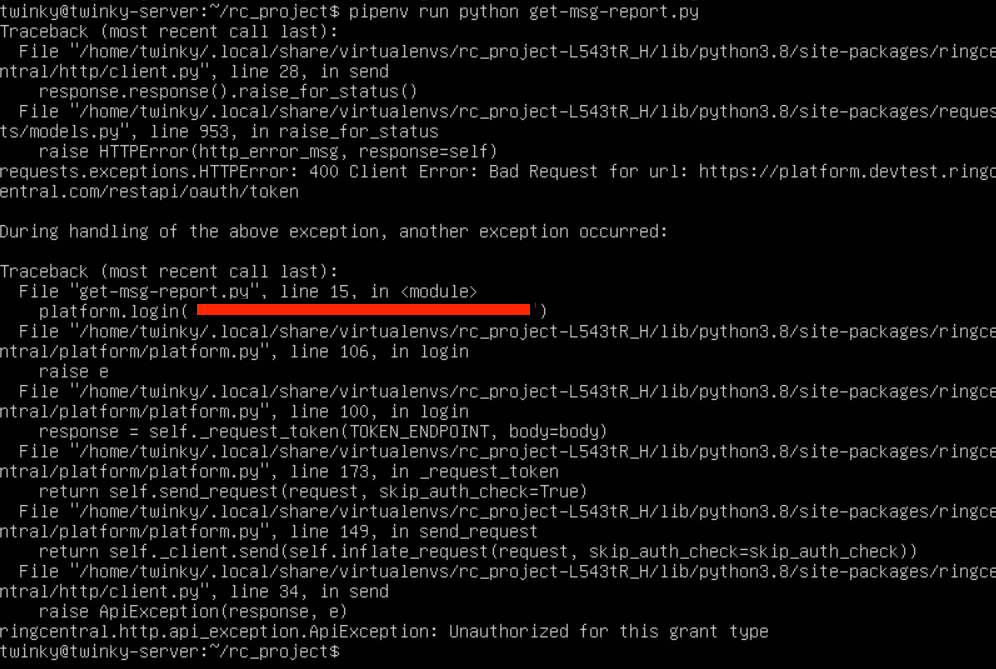
screen-shot-2021-12-15-at-80429-pm.png


    3 replies

    PhongVu
    Community Manager
    Community Manager
    December 16, 2021

    Since your code fails at authentication and the error was "unauthorized for this grant type", I guessed that your app platform type is not password flow type. The sample code in the message store export is using username and password to authenticate. So login your developer portal and open your app settings to check the platform type. If it's not Server only/ No UI type, then create a new app with that type and retry. Remember also, in order to export the message store, you need to authenticate the app with a user with the super admin role.

    For your other observation, there is nothing to do with the Engage Digital so it should not be related. You can also search for "unauthorized for this grant type" from the community to see previously questions and answers.

    The First Step
    December 17, 2021

    Hi Phong,

    This is the setting I have set for the app:

    screen-shot-2021-12-16-at-112402-pm.png

    I've also tried the 3-legged option as well with the "Server-side web app" option selected but I get an Error HTTP 400.

    screen-shot-2021-12-16-at-114740-pm.png

    This is my code for reference:

    from ringcentral import SDK
    import json
    
    with open('rc-credentials.json') as data_file:
        data = json.load(data_file)
    
    
    CLIENTID = data['RINGCENTRAL_CLIENTID']
    CLIENTSECRET =  data['RINGCENTRAL_CLIENTSECRET']
    SERVERURL = data['RINGCENTRAL_SERVER']
    RCUSERNAME = data['RINGCENTRAL_USERNAME']
    RCEXTENSION = data['RINGCENTRAL_EXTENSION']
    RCPASSWORD = data['RINGCENTRAL_PASSWORD']
    
    
    rcsdk = SDK(CLIENTID, CLIENTSECRET, SERVERURL)
    platform = rcsdk.platform()
    platform.login(RCUSERNAME, RCEXTENSION, RCPASSWORD)
    response = platform.post(f'/restapi/v1.0/account/705444005/message-store-report', {
            'dateFrom': '2021-12-01',
            'dateTo': '2021-12-30',
            'messageType': ['VoiceMail']
        })
    The First Step
    December 17, 2021

    Hello,

    I've found the issue! The dateTo/From had to be in this format:

    2019-07-31T20:01:58Z

    I get a successful call to the API now. Thank you!