




The First Step
March 24, 2022
Solved

How to set direct number as default in RingCentral for Salesforce

  • March 24, 2022
  • 2 replies
  • 559 views

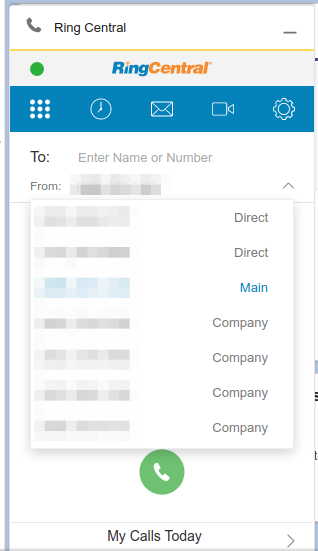
Every time a user logs in, the Main number is set as the "From" number. The preference would be to have their direct number as the only option on that list.


Settings --> Calls --> "Make my calls with" is set to Browser

selection-402.png

Any ideas?

    Best answer by Joe Cache

    Don't bother Mary - I've been asking for that feature for a while... well, that and the ability to only have the extension use only XXXX number - not be able to choose block, etc.

    Mark,

    That setting is hidden in the Extension Settings - in a field you wouldn't think:

    Go to a user
    Click on the tab for 'Outbound Calls/Faxes'
    Click the down arrow to expand on Caller ID.
    The field you want is in the lower-right - the 'Alternate Caller ID'

    Setting this to the number you want the extension to use will set it from that point on.

    Have fun.


    2 replies

    Mary-Community_Moderator
    Community Manager
    Community Manager
    March 24, 2022

    @Mark Schultz I'm currently digging information about your question. Thank you!

    Joe Cache
    RingCentral VIBE Royalty
    Joe CacheAnswer
    RingCentral VIBE Royalty
    March 24, 2022

    Don't bother Mary - I've been asking for that feature for a while... well, that and the ability to only have the extension use only XXXX number - not be able to choose block, etc.

    Mark,

    That setting is hidden in the Extension Settings - in a field you wouldn't think:

    Go to a user
    Click on the tab for 'Outbound Calls/Faxes'
    Click the down arrow to expand on Caller ID.
    The field you want is in the lower-right - the 'Alternate Caller ID'

    Setting this to the number you want the extension to use will set it from that point on.

    Have fun.