



Solved

Where to change call queue announcement for after hours

  • April 10, 2026
  • 2 replies
  • 39 views

Hi all,

We have this call Queue and during after hours we want to play a message but not offer the caller to leave a voicemail.
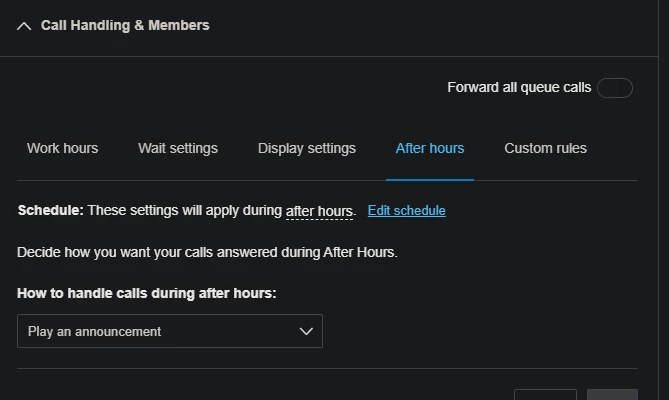
 

But as you can see from the screenshot I don’t get any option to alter what the announcement is.

But If I use a custom rule I can edit and go and upload a custom message.
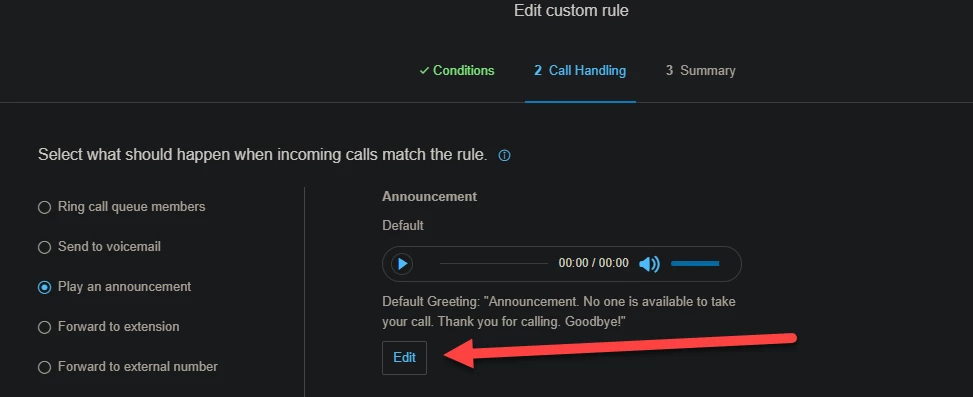


Do I simply have to use a custom rule or message only extension to configure this? 
Best answer by Lhomem

Hi,

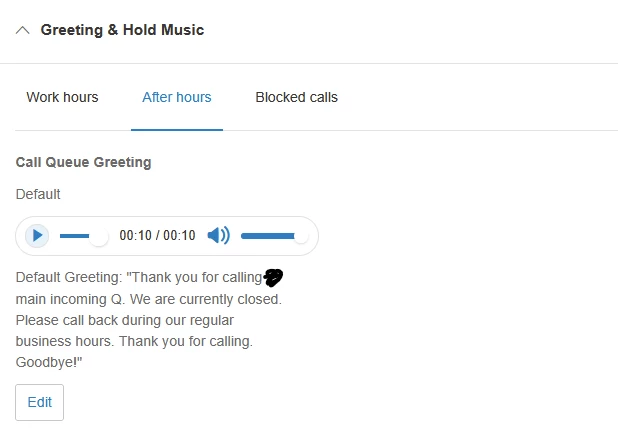
Choose play announcement and save it. then go to Greetings and hold music, go to after hours and you will be able to upload a greeting there, that will be played after hours for the queue. You could also use forward to extension and choose an announcement only extension.

Hope this helps.


2 replies

Forum|alt.badge.img
  • New Participant
  • Answer
  • April 10, 2026

Hi,

Choose play announcement and save it. then go to Greetings and hold music, go to after hours and you will be able to upload a greeting there, that will be played after hours for the queue. You could also use forward to extension and choose an announcement only extension.

Hope this helps.


Mary-Community_Moderator
Community Manager
Forum|alt.badge.img+3

Hi ​@H.KenneallyWW , if ​@Lhomem was able to help resolve your concern, could you kindly mark their response as “Best Answer”? This really helps others in the community find solutions faster. Thanks! 😊